


If you’ve been hearing about IPTV and want to try it without spending money upfront, you’re in the right place. An IPTV free trial is the best way to explore live TV channels, movies, and streaming services before committing to a subscription.
In this beginner-friendly guide, you’ll learn exactly what IPTV is, how a free trial works, and how to set it up step by step—no technical experience needed.
Table of contents
- What is IPTV?
- What is an IPTV Free Trial?
- Benefits of Using an IPTV Free Trial
- Things You Need Before Starting
- Step-by-Step Guide to Start IPTV Free Trial
- Best Devices for IPTV Free Trial
- Common Problems and Fixes
- Tips to Choose the Best IPTV Service
- Is IPTV Legal?
- IPTV Free Trial vs Paid Subscription
- Frequently Asked Questions (FAQs)
- Conclusion
What is IPTV?
IPTV stands for Internet Protocol Television, which means watching TV content through the internet instead of traditional cable or satellite.
With IPTV, you can stream:
- Live TV channels
- Movies and TV shows (on-demand)
- Sports events
- International channels
Unlike cable TV, IPTV is more flexible, affordable, and works on multiple devices.
What is an IPTV Free Trial?
An IPTV free trial is a limited-time access provided by IPTV services so users can test their platform before buying.
Key Features of IPTV Free Trial:
- Usually lasts 24–48 hours (sometimes longer)
- Access to premium channels
- No long-term commitment
- Helps test stream quality and performance
Benefits of Using an IPTV Free Trial
Before buying any IPTV subscription, a free trial gives you several advantages:
✔ Test Streaming Quality
Check if the service offers:
- Smooth playback
- HD or 4K streaming
- Minimal buffering
✔ Explore Channel List
You can see:
- Sports channels
- Movies and series
- International content
✔ Check Device Compatibility
Make sure it works on your:
- Smart TV
- Android phone
- Firestick
- PC or laptop
✔ Avoid Scams
Many IPTV services are unreliable. A trial helps you avoid wasting money.
Things You Need Before Starting

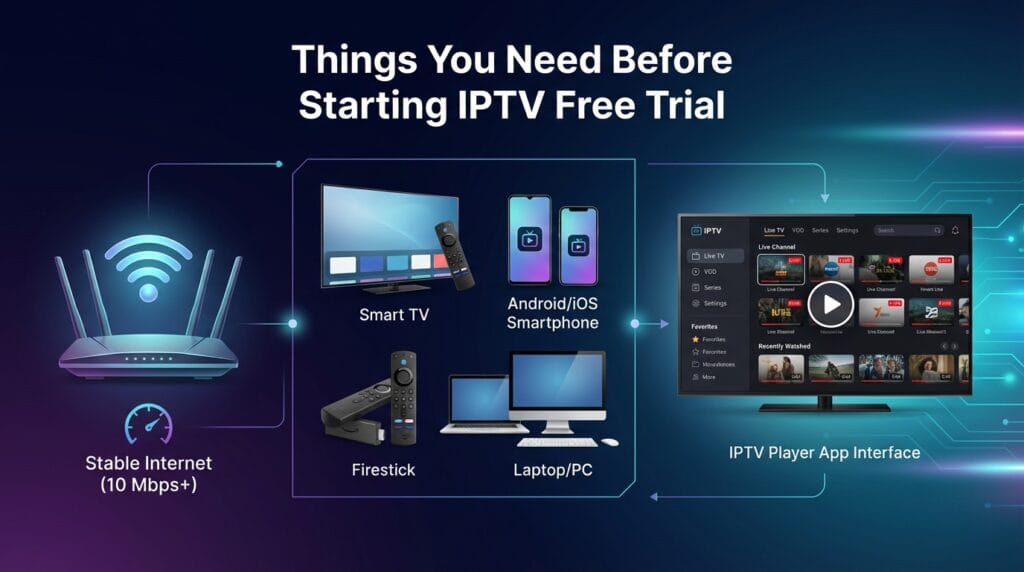
Before you begin your IPTV free trial setup, make sure you have:
- A stable internet connection (at least 10 Mbps)
- A compatible device:
- Smart TV
- Android/iOS phone
- Firestick
- PC or laptop
- An IPTV player app (we’ll cover this below)
Step-by-Step Guide to Start IPTV Free Trial
Follow these simple steps to get started:
Step 1: Choose a Reliable IPTV Provider
Search online for trusted IPTV providers offering free trials. Look for:
- Positive reviews
- Fast support
- Trial availability
👉 Avoid providers with no reviews or suspicious pricing.
Step 2: Request a Free Trial
Most IPTV services require:
- Your email address
- Sometimes WhatsApp or Telegram contact
After requesting, you’ll receive:
- M3U URL or Xtream Codes
- Login credentials
Step 3: Install an IPTV Player App
You need an app to run IPTV services.
Popular IPTV Player Apps:
- IPTV Smarters Pro
- TiviMate
- GSE Smart IPTV
- VLC Media Player (for PC)
Install any of these apps on your device.
Step 4: Add IPTV Credentials
Open the IPTV app and choose one of these options:
- Login with Xtream Codes API
- Load M3U playlist
Enter the details provided by your IPTV provider.
Step 5: Start Watching
Once logged in:
- Channels will load automatically
- Browse categories like Live TV, Movies, Series
- Start streaming instantly
Best Devices for IPTV Free Trial
Here are some devices that work best with IPTV:
📺 Smart TVs
- Samsung Smart TV
- LG Smart TV
🔥 Streaming Devices
- Amazon Firestick
- Android TV Box
📱 Mobile Devices
- Android smartphones
- iPhones and iPads
💻 Computers
- Windows PC
- MacBook
Common Problems and Fixes
While using an IP TV free trial, you might face some issues:
Buffering Issues
Fix:
- Use faster internet (20+ Mbps recommended)
- Connect via Ethernet instead of WiFi
Channels Not Loading
Fix:
- Restart the app
- Re-enter credentials
App Crashing
Fix:
- Update the app
- Clear cache
Tips to Choose the Best IPTV Service
After testing your IP TV free trial, use these tips before buying:
🔍 Check Content Quality
- HD/4K availability
- No lag or freezing
📡 Server Stability
- Minimal downtime
- Fast channel switching
💬 Customer Support
- Quick response time
- Available on WhatsApp or live chat
💰 Pricing Plans
- Monthly, quarterly, yearly options
- Avoid very cheap services (often low quality)
Is IPTV Legal?
IPTV legality depends on the provider and content licensing.
- Legal IPTV services: Licensed content providers
- Unverified IPTV services: May stream pirated content
👉 Always choose reputable services to stay safe.
IPTV Free Trial vs Paid Subscription
| Feature | Free Trial | Paid Subscription |
|---|---|---|
| Duration | 24–48 hours | Monthly/Yearly |
| Access | Limited | Full access |
| Support | Basic | Priority support |
| Stability | Testing phase | Better performance |
Frequently Asked Questions (FAQs)
An IPTV free trial allows you to test an IP TV service for a limited time before purchasing a subscription.
Most trials last between 24 to 48 hours, but some providers offer longer durations.
No, a genuine IP TV free trial is completely free with no upfront payment.
Yes, IPTV works perfectly on Android and iOS devices using apps like IPTV Smarters.
Buffering usually happens due to slow internet or server issues. Use a faster connection for better performance.
Yes, IPTV is more flexible, affordable, and offers more content compared to traditional cable TV.
Yes, since it’s a trial, there is no obligation to continue or pay.
Conclusion
An IPTV free trial is the smartest way to explore IP TV services without any risk. It helps you test streaming quality, channel variety, and overall performance before making a decision.
If you’re new to IPTV, just follow the simple steps in this guide:
- Choose a trusted provider
- Install an IPTV app
- Enter your credentials
- Start streaming
Take your time during the trial and evaluate everything carefully. This way, you’ll end up choosing the best IPTV service that fits your needs and budget.


