



L Shaped Gaming Desk Setup Ideas for Maximum Comfort
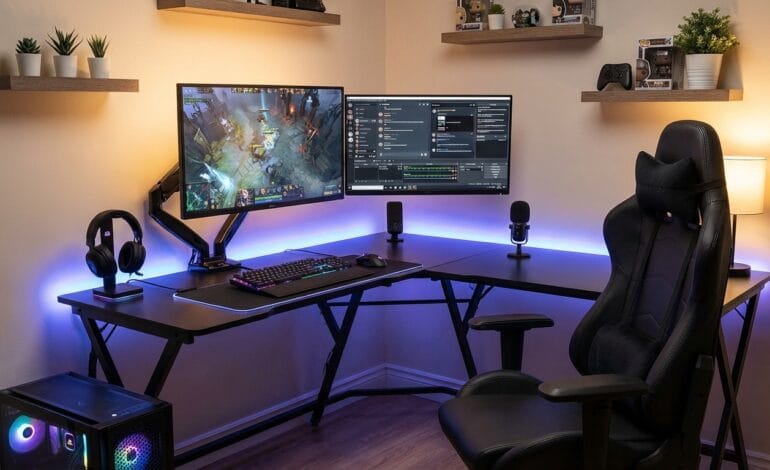

Table of contents
- Why Choose an L-Shaped Gaming Desk?
- Planning Your L-Shaped Gaming Desk Setup
- Ergonomic Setup for Maximum Comfort
- Monitor Placement Ideas for L-Shaped Desks
- Cable Management for a Clean Gaming Setup
- Lighting Ideas to Enhance Comfort and Style
- Accessory Placement for Productivity & Comfort
- Gaming Console Setup on an L-Shaped Desk
- Best L-Shaped Desk Setup Ideas by Room Type
- Storage Solutions for L-Shaped Gaming Desks
- Health Tips for Long Gaming Sessions
- Best Materials for L-Shaped Gaming Desks
- Budget vs Premium L-Shaped Desk Setups
- Common Mistakes to Avoid
- Frequently Asked Questions (FAQs)
- Conclusion
A perfect gaming setup is not just about high-end graphics cards or RGB lighting—it starts with the right desk. Among all desk styles, the L shaped gaming desk has become a top choice for gamers, streamers, and content creators because of its space efficiency, ergonomic benefits, and multi-tasking potential.
In this detailed guide, you’ll discover L-shaped gaming desk setup ideas for maximum comfort, including ergonomics, cable management, monitor placement, accessories, lighting, and room layout tips. Whether you are a casual gamer or a professional streamer, this guide will help you build a comfortable, stylish, and performance-optimized gaming station.
Why Choose an L-Shaped Gaming Desk?
Before diving into setup ideas, it’s important to understand why L-shaped desks are so popular in gaming spaces.
1. Maximum Surface Area
An L-shaped desk provides significantly more workspace than a standard desk. You can easily place:
- Multiple monitors
- Keyboard and mouse
- Gaming console
- Speakers
- Streaming gear
2. Better Organization
With two connected surfaces, you can separate tasks:
- One side for gaming
- One side for work, editing, or streaming
3. Ideal for Corners
L-shaped desks fit perfectly into corners, saving room space and making them ideal for small bedrooms or gaming rooms.
4. Enhanced Ergonomics
Proper positioning reduces strain on your neck, shoulders, and wrists—especially during long gaming sessions.
Planning Your L-Shaped Gaming Desk Setup
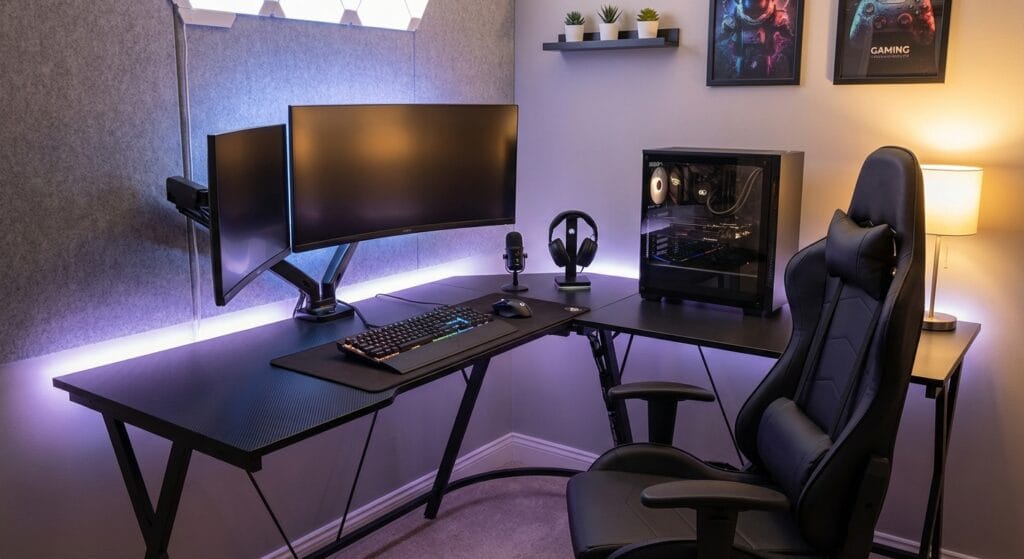
Measure Your Space First
Before buying or arranging your desk:
- Measure wall length and width
- Check door clearance
- Ensure chair movement space
Choose the Right Desk Size
Common sizes include:
- Small (47–55 inches) – Ideal for compact rooms
- Medium (55–63 inches) – Balanced for gaming + work
- Large (63–75 inches) – Best for multi-monitor or streaming setups
Ergonomic Setup for Maximum Comfort
Comfort is the foundation of any great gaming setup.
1. Proper Desk Height
- Ideal height: 28–30 inches
- Your elbows should form a 90-degree angle when typing or gaming
2. Chair Placement
- Center your chair where the two desk sections meet
- Use a gaming chair with lumbar and neck support
- Adjust seat height so feet rest flat on the floor
3. Keyboard & Mouse Position
- Keep keyboard directly in front of you
- Mouse should be on the dominant hand side
- Use a large mouse pad for smoother movement
Monitor Placement Ideas for L-Shaped Desks
Single Monitor Setup
- Place the monitor at the center corner of the desk
- Eye level should align with the top of the screen
Dual Monitor Setup
- Main monitor directly in front
- Second monitor angled at 30–45 degrees
- Ideal for gaming + Discord, chat, or streaming controls
Triple Monitor Setup
- Best for simulation or competitive gaming
- Center monitor straight
- Side monitors angled inward
💡 Pro Tip: Use monitor arms to free desk space and improve adjustability.
Cable Management for a Clean Gaming Setup
Messy cables ruin comfort and aesthetics.
Essential Cable Management Tools
- Cable trays under the desk
- Velcro cable ties
- Cable sleeves
- Adhesive cable clips
Power Strip Placement
- Mount power strips under the desk
- Keep cables off the floor to avoid tangling
A clean setup improves airflow, reduces distractions, and enhances focus.
Lighting Ideas to Enhance Comfort and Style
RGB Lighting
- LED strips under the desk
- Backlight behind monitors (bias lighting)
- RGB desk edges for immersive gaming
Warm Lighting for Eye Comfort
- Desk lamp with warm white light
- Avoid harsh overhead lights
Smart Lighting
- Sync lights with games using software
- Adjust brightness for day/night gaming
Accessory Placement for Productivity & Comfort
Headphone Stand
- Mount under the desk or place on the corner
Controller Dock
- Keep controllers charged and organized
Cup Holder
- Prevent spills during intense gaming sessions
Stream Deck
- Place on the secondary desk wing for easy access
Gaming Console Setup on an L-Shaped Desk
If you use a PlayStation or Xbox:
- Place the console on the side wing
- Ensure proper ventilation
- Use vertical stands if space is limited
This separation prevents overheating and keeps your main gaming area clutter-free.
Best L-Shaped Desk Setup Ideas by Room Type
Small Room Setup
- Compact L-shaped desk
- Wall-mounted shelves
- Monitor arms instead of stands
Bedroom Gaming Setup
- Neutral colors for a calm look
- Soft LED lighting
- Noise-reducing desk mat
Professional Streaming Setup
- One wing for gaming
- One wing for camera, mic, and mixer
- Acoustic panels on walls
Storage Solutions for L-Shaped Gaming Desks
Under-Desk Storage
- Drawers
- CPU holder
- Cable baskets
Above-Desk Storage
- Floating shelves
- Pegboards for accessories
Keeping everything organized boosts efficiency and comfort.
Health Tips for Long Gaming Sessions
- Take a 5–10 minute break every hour
- Stretch wrists, neck, and shoulders
- Use blue light filter glasses
- Maintain proper posture
Comfort is not just furniture—it’s habits.
Best Materials for L-Shaped Gaming Desks
Wood
- Stylish and durable
- Ideal for classic or minimalist setups
Metal Frame
- Strong and stable
- Best for heavy equipment
Carbon Fiber Finish
- Popular in gaming desks
- Sleek, modern look
Budget vs Premium L-Shaped Desk Setups
Budget Setup
- Simple desk
- Single or dual monitors
- Minimal accessories
Premium Setup
- Motorized sit-stand desk
- Multi-monitor arms
- Smart lighting and cable management
Both can be comfortable if set up correctly.
Common Mistakes to Avoid
❌ Desk too small for your gear
❌ Poor monitor height
❌ No cable management
❌ Ignoring chair ergonomics
❌ Overcrowding the desk
Avoiding these mistakes ensures long-term comfort.
Frequently Asked Questions (FAQs)
1. Is an L-shaped desk good for gaming?
Yes, L-shaped desks are excellent for gaming because they offer more space, better organization, and improved ergonomics.
2. How much space do I need for an L-shaped gaming desk?
You typically need at least 5×5 feet of space, but larger desks may require more room.
3. Can I use an L-shaped desk for streaming?
Absolutely. One side can be dedicated to gaming and the other to streaming equipment like cameras, microphones, and mixers.
4. What is the best monitor setup for an L-shaped desk?
A dual or triple monitor setup works best, with the main monitor centered and others angled for easy viewing.
5. Are L-shaped desks good for small rooms?
Yes, especially when placed in corners. Compact models are ideal for small bedrooms or apartments.
6. How do I keep my L-shaped desk comfortable for long hours?
Use an ergonomic chair, proper monitor height, wrist support, good lighting, and take regular breaks.
Conclusion
An L-shaped gaming desk setup is one of the best investments for gamers who value comfort, organization, and performance. With proper planning, ergonomic positioning, clean cable management, and smart lighting, you can transform your gaming space into a professional-level setup.
Whether you’re gaming, streaming, or working, these L-shaped gaming desk setup ideas for maximum comfort will help you stay focused, comfortable, and competitive for years to come.